Synametrics Global Support
As a Synametrics customer, you can expect our highly trained, responsive, and knowledgeable Global Support Engineers to assist you throughout the different phases of your implementation and deployment, and beyond. Our support team not only provides you with access to a world-class support network but also shares essential knowledge, enabling you to quickly gain technical self-sufficiency.
The following features are available for the Community Edition, which is licensed only for Home/Personal use.
- Free upgrades to the software
- Access to our public discussion forums. These forums are open to the public. Although our engineers occasionally answer questions posted by other users, there is no guarantee of response time.
- Support discussion list. Click here for details.
- Access to our Knowledge Base articles.
The following features are included at no additional cost:
- Everything included in basic support
- Email support
- Telephone support, during our normal business hours (9 AM - 5 PM EST, Monday through Friday). Our phone number is: +1 609-750-0007 ext. 2
- Priority response
- Access to pre-release versions of the software
Extended Support 24x7 Support
We understand that some organizations require constant support for their mission-critical applications. To accommodate this need, we offer a 24x7 support option tailored specifically for such scenarios. This service ensures that expert assistance is available at any time of day or night, providing peace of mind and reliability for your operations. Please note that this premium support comes at an additional cost to ensure the highest level of service and responsiveness.
- Guaranteed support within 15 minutes
- Costs $399/incident (USD)
- Contact our sales team for details.
Initiating Support Tickets
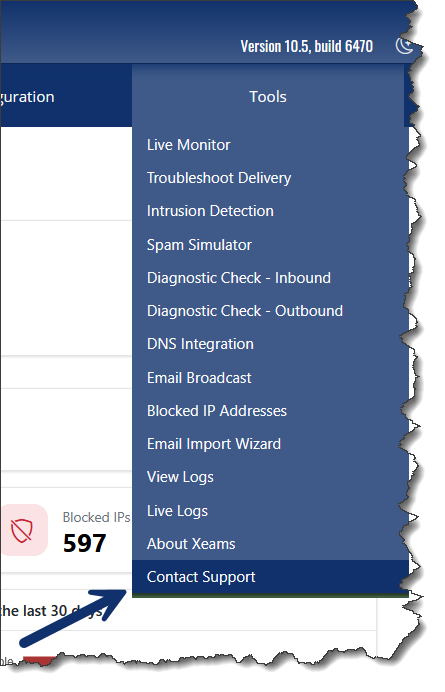
To create a new support ticket, we recommend that you click Tools > Contact Support from your existing Xeams web interface. This method includes an option to send us log files, which are crucial for troubleshooting common problems.
This method offers several benefits:
- It works over HTTP. This means you can reach us even if your email isn't working.
- It allows you to check the status of your submitted ticket.
- It allows you to check the status of your previous tickets.
- You can copy/paste images when composing your messages.
- Submit log files from your Xeams, which are very helpful in troubleshooting.
What To Expect After Submitting a Ticket
- If you have an Enterprise License, we will respond to your ticket within 24 hours, provided it's not a weekend.
- You may receive an email right away from our AI agent acknowledging the receipt of your message and providing some preliminary help, if applicable. Note that a human support agent will always respond, even if the answer generated by the AI agent is enough to resolve your inquiry.
- You can check the status of your tickets in our ticketing system.
Direct Email
If your Xeams interface is completely unavailable, or you have a support-related pre-sales question, you may always send us a direct email to support@synametrics.com